Quality Pilot Agent
Your QA specialist for test plans, manual test cases, regression suites, Figma validation, and bug documentation.
Overview
Quality Pilot Agent is a specialist assistant built for quality assurance work. Use it when you need structured test planning, manual test case generation, regression suite design, design validation against Figma, or clear bug documentation — instead of asking in general chat. Launch the agent from the catalog, describe what you are testing, and the agent produces ready-to-use QA artefacts using approved templates. Share feature scope, requirements, user stories, or design links up front so outputs stay accurate and complete.
End-to-end flow
A simple path to follow:
Left sidebar → Click Agents → Find Quality Pilot Agent → Launch agent → Describe your testing goal (feature, requirements, or design) → Receive a structured test plan → Ask for manual test cases, a regression suite, Figma validation, or bug documentation → Review the output → Refine with follow-up questions in the same agent chat
How it works
Test planning:
The agent creates test plans using an approved planning template. Describe the feature, user flow, or acceptance criteria you want covered — the agent builds a structured plan you can use as the foundation for all further testing work.
Manual test cases:
After a test plan is ready, ask the agent to generate manual test cases from that plan. Cases are structured with clear steps and expected results, ready for review or import into your test management workflow.
Regression suites:
When you need to confirm existing functionality still works after a change, ask the agent to build a regression test suite. Share what changed and which areas are at risk so coverage focuses on the right flows.
Figma design validation:
Provide a Figma design link or describe the screens you want checked. The agent compares the design against expected behaviour and highlights gaps, inconsistencies, or missing states before development or release.
Bug documentation:
When you find a defect, ask the agent to document it clearly — steps to reproduce, expected vs actual behaviour, environment details, and severity — so developers can pick it up without back-and-forth.
Template-driven output:
The agent uses external QA templates to create plans and test cases. Outputs follow a consistent, reusable format rather than free-form chat replies.
Clean, final responses:
The agent delivers finished artefacts — not draft notes or internal process commentary. You receive the test plan, cases, suite, validation summary, or bug report ready to use or share with your team.
Tip:
Start with a test plan before requesting cases or regression coverage. A clear plan gives the agent the structure it needs to produce complete, accurate test artefacts. Keep one agent chat per feature or release so context stays focused.
Walkthrough
1. Launch Quality Pilot Agent
Click Agents in the left sidebar, then find Quality Pilot Agent in the catalog. Read the card description to confirm it matches your QA task, then Launch agent to open a dedicated chat scoped to quality assurance work. Include project or feature context in your first message — for example, the module name, sprint, or release you are testing.
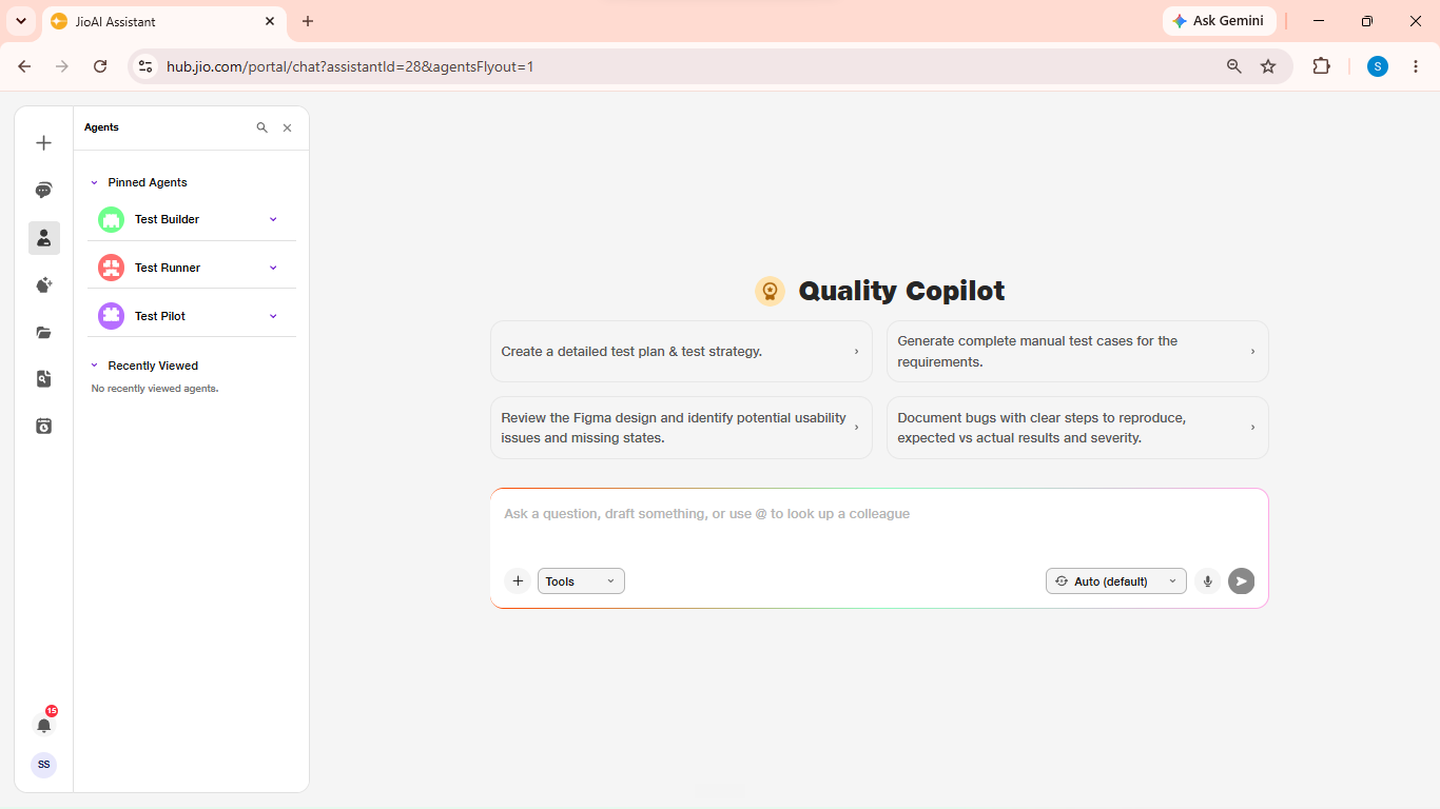
- Catalog: Browse available agents.
- Launch agent: Opens a dedicated QA chat.
2. Request a test plan
Describe what you need tested — feature name, user stories, acceptance criteria, or attached requirements. Ask the agent to create a test plan for that scope. The agent uses the qa-test-planner template to produce a structured plan covering the areas you described. Review the plan and ask for changes if any section is missing or needs more detail.
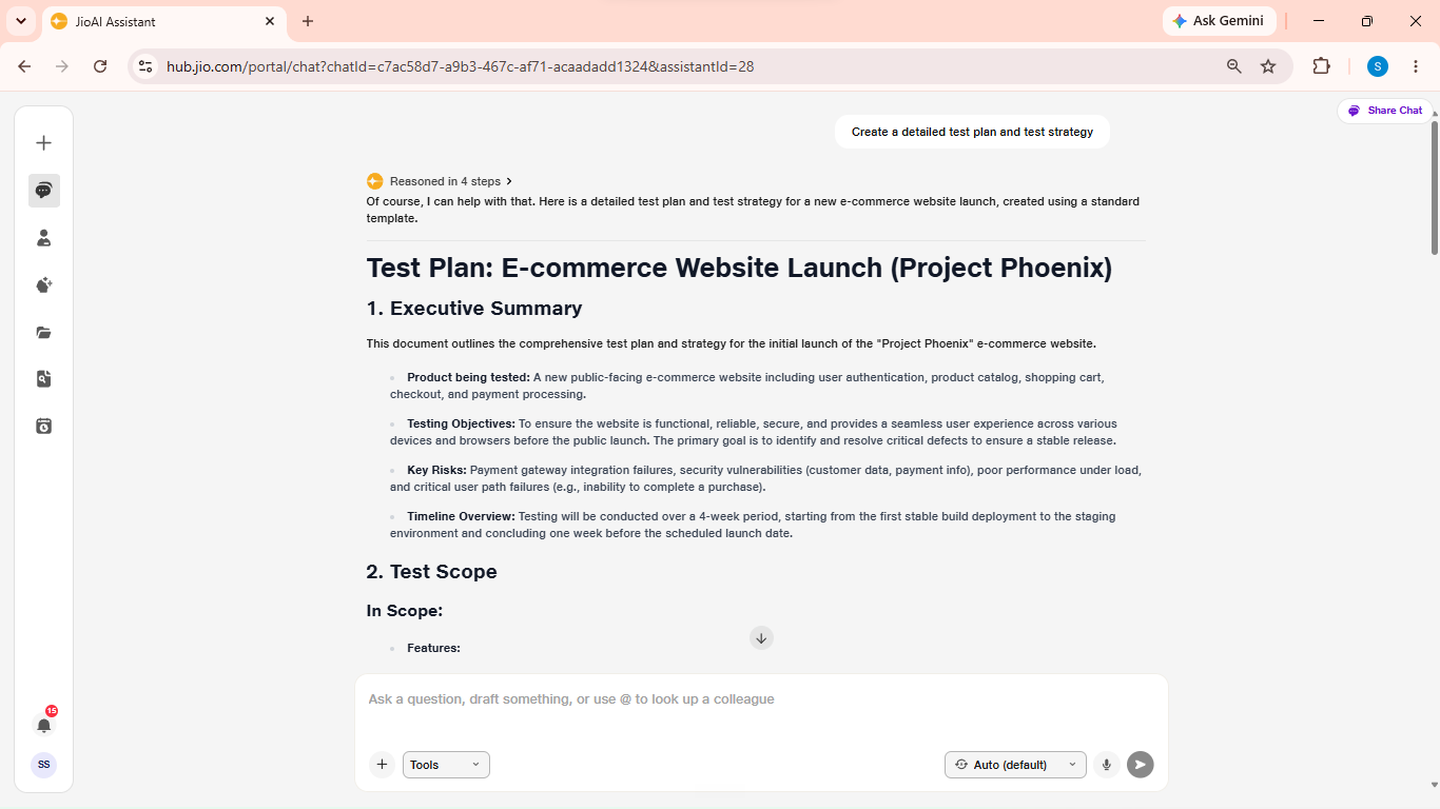
- Test plan: Structured coverage outline for your feature.
- Scope: Share requirements or user stories for better accuracy.
3. Generate manual test cases
Once the test plan is ready, ask the agent to generate manual test cases based on it. Specify any format preferences — priority levels, tags, or focus areas — in the same message. The agent builds cases from the approved plan template, with steps and expected results you can review, refine, or export to your test management tool.
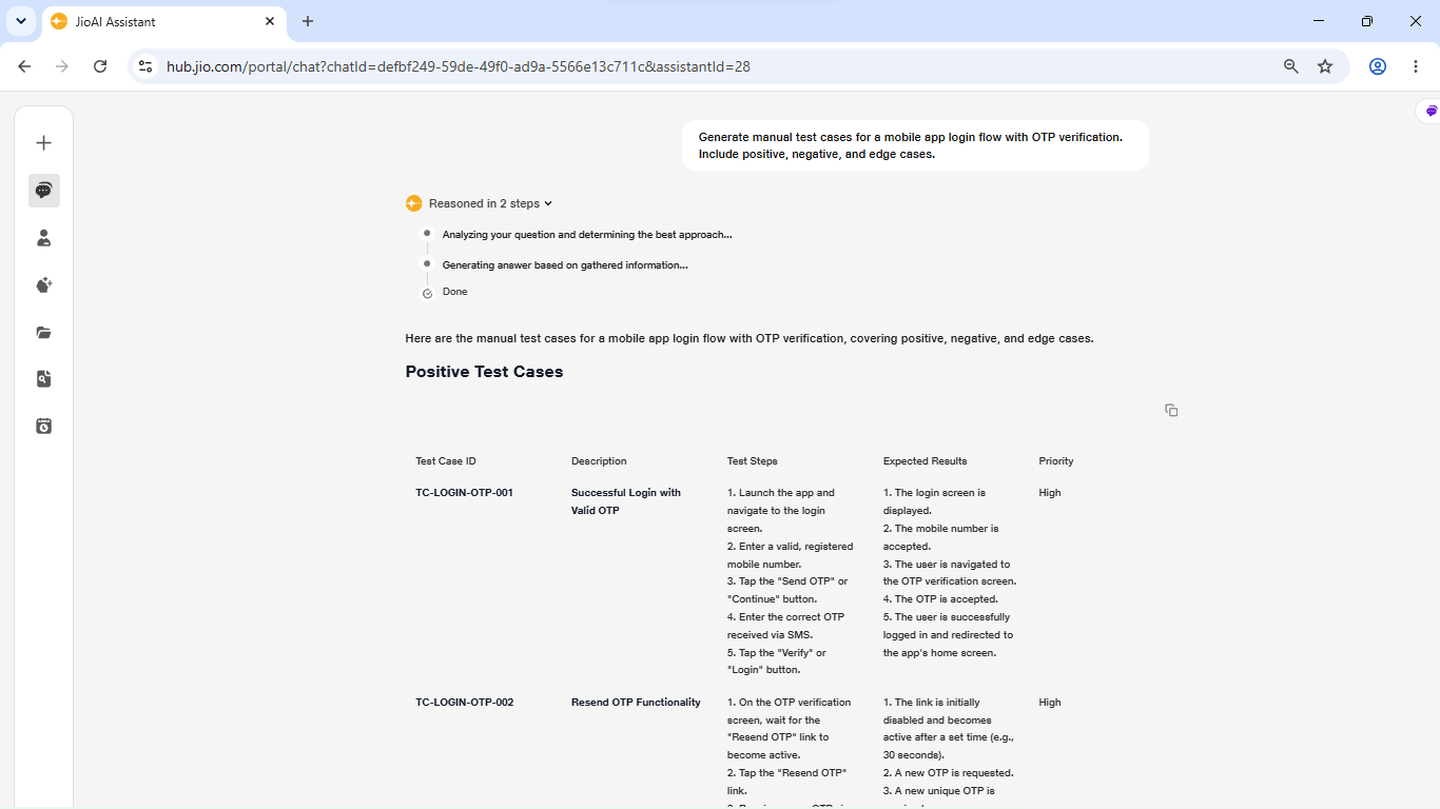
- Manual test cases: Step-by-step cases aligned to the plan.
- Refine: Ask follow-ups to add, remove, or update cases.
4. Build a regression suite
When you need regression coverage, tell the agent what changed and which existing flows may be affected. Ask it to build a regression test suite from the current plan or from a new scope you provide. Review the suite for critical-path coverage and ask the agent to add or remove scenarios before you hand it off to the team.
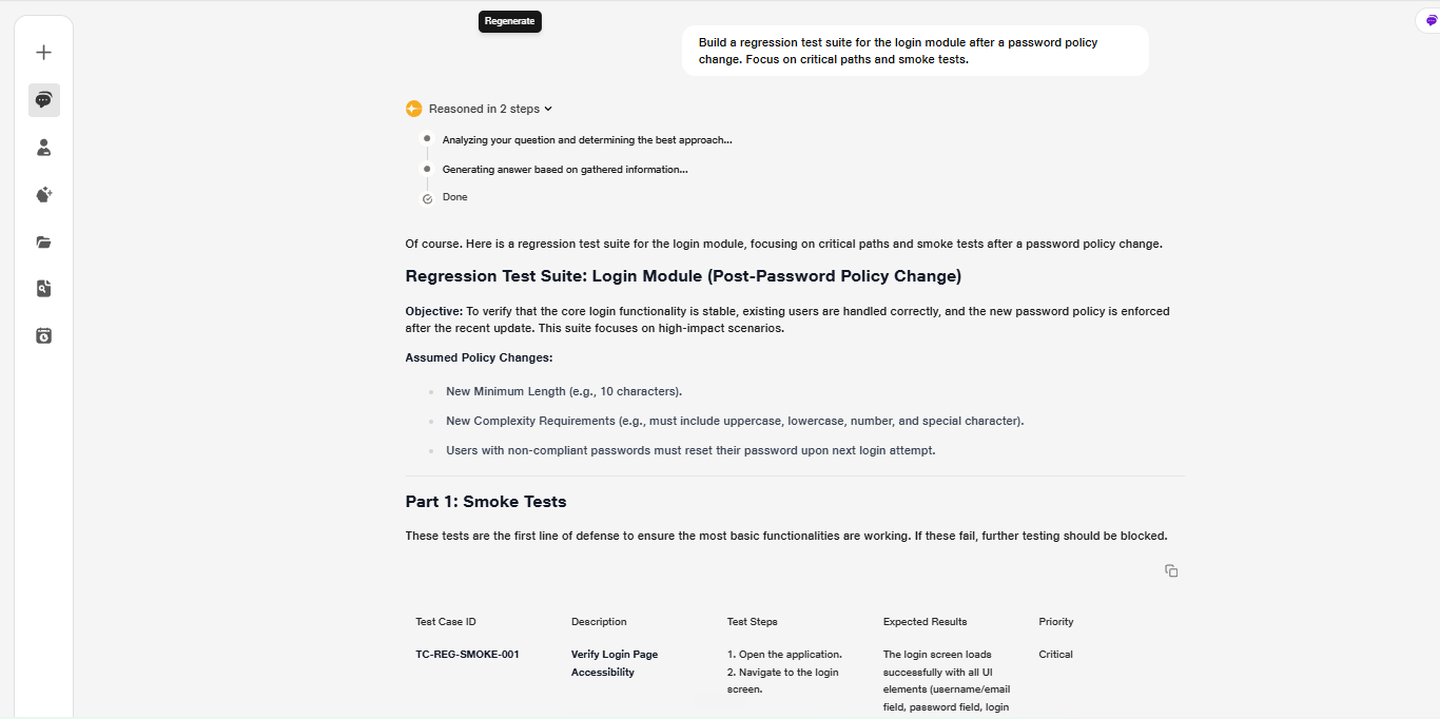
- Regression suite: Validates existing functionality after changes.
- Risk areas: Name the modules or flows most likely to break.
5. Validate designs and document bugs
For design checks, share a Figma link or describe the screens to validate. Ask the agent to compare the design against expected behaviour and list gaps or inconsistencies. For defects, describe what you observed and ask the agent to document the bug — reproduction steps, expected vs actual result, and severity — in a format your team can action immediately.
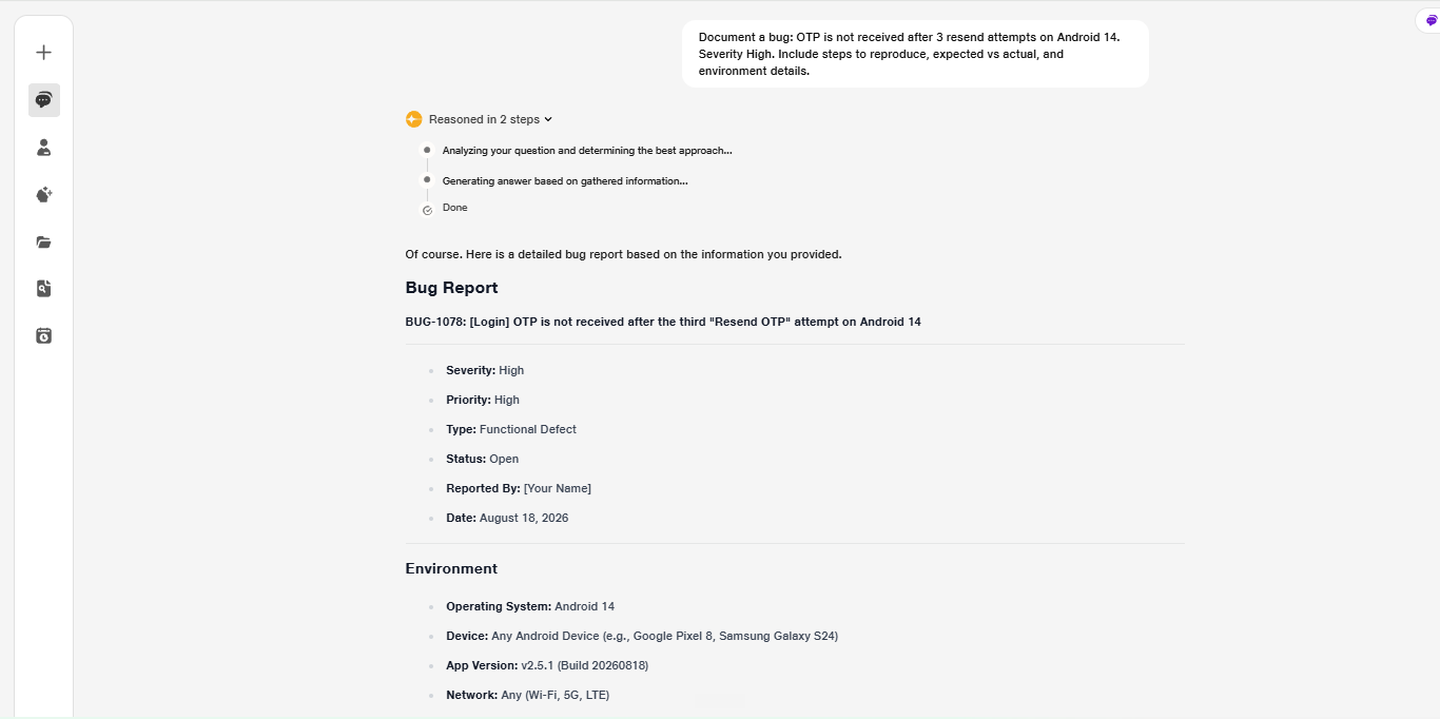
- Figma validation: Design vs expected behaviour comparison.
- Bug documentation: Clear, developer-ready defect write-ups.